


Anyone involved in email marketing will repeatedly encounter the technical terms DKIM, SPF, and DMARC. In short, these are authentication methods designed, among other things, to prevent someone from sending emails in someone else's name and practicing email spoofing (forgery).
What are DKIM, SPF, and DMARC?
Let's first clarify what these terms mean:
What is DKIM?
With DKIM, the email is digitally signed before it is sent, which the receiving email server can verify using the public key available in the domain's Domain Name System (DNS).
If verification fails, the receiving mail transfer agent (email server) has the option of rejecting (bouncing) or sorting out the email. In most cases, the email ends up in spam or the trash; it is rarely rejected.
Once an email has been signed with DKIM, the corresponding public key must be present in the DNS of the relevant domain as a TXT entry. If this is not the case, the delivery rate of the email will deteriorate significantly due to negative authentication.
What is SPF?
SPF is a method designed to prevent the sender address of an email from being forged. When an email arrives, the receiving email server searches the sender's DNS for a TXT entry that specifies which email senders are authorized to send the email.
If such a record does not exist, the email server may assume that the current sender is not authorized to send the email and may reject the email accordingly.
What is DMARC?
DMARC is a specification for combining SPF and DKIM to ensure that emails are handled strictly according to the specifications of the legitimate email sender.
DMARC also requires a DNS entry that specifies how emails protected by SPF and DKIM should be handled. For example, it can be configured to notify the sender if the address is misused.
It is also possible to specify how an email that has failed authentication should be handled. For example, the email can be accepted despite failed authentication.
How can DKIM, SPF, and DMARC be validated?
As a rule, the sender of the email must ensure that the email is protected against manipulation and misuse in accordance with current standards. All reputable email marketing providers generally perform this task satisfactorily.
When newsletters are sent using proprietary software, it is typically necessary to set up and configure the email servers. In such cases, the relevant security functions must also be implemented.
Another reason to use a reliable newsletter service is that sending large volumes of emails through improperly configured servers can have serious consequences. Managing one's own mail servers requires thorough technical knowledge to avoid potential issues.
Whether using proprietary email servers or a professional service, it is important in both cases to verify that the email is ready for sending. At a minimum, the technical components should be tested, and ideally, the content of the email should also be reviewed.
For this purpose, we recommend EmailChecky's DKIM, SPF, and DMARC validator. It checks the entire technical part of the email and also includes some very interesting functions for checking the content.
The complete analysis includes:
- Technical check — during the technical check, EmailChecky analyzes the technology behind the email. Any detected errors are reported, along with instructions for corrective action.
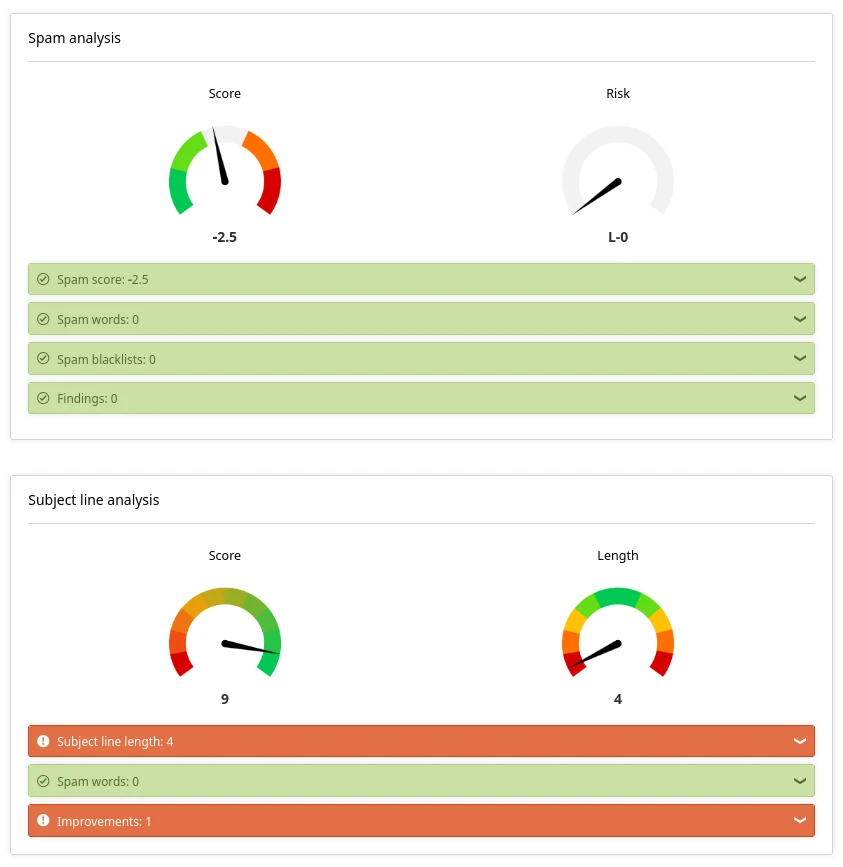
- Content check — during the content check, the content of the email is analyzed and evaluated. The spam check and text readability are particularly useful functions. Among other things, the subject line is also analyzed.
- Checking for common errors — Emails often contain errors that are not immediately apparent. EmailChecky recognizes many of these errors and clearly points them out.
To validate DKIM, SPF, and DMARC, EmailChecky is a good option. It's the fastest and easiest way to get reliable results. But it's not the only way to validate. Here are the results of the spam and subject line analysis:
Alternatively, the email can be sent to a Gmail address, and the email header can be examined. A successful configuration should display results for DKIM, SPF, and DMARC similar to the following:
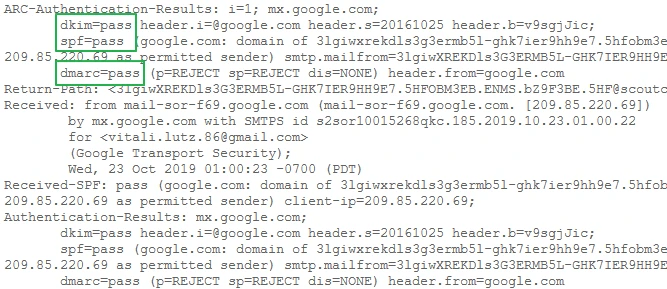
If the result is negative in either Gmail or the EmailChecky tool, the issue must be investigated on the server. If a third-party service is used, the service provider should be notified.
Conclusion
Validating DKIM, SPF, and DMARC is straightforward when the appropriate tools are used. EmailChecky simplifies this process and includes additional features for detailed analysis of the email content.
Alternatively, simply send an email to Gmail and check the header of the email to see if the result for DKIM, SPF, and DMARC is positive. In any case, all of these procedures must be implemented correctly when sending bulk mail.
Sending an email with a technical basis that is incorrectly configured will always reduce the delivery rate of the email campaign. Anyone with a large email list will notice a lot of email bouncebacks if DKIM, SPF, and DMARC are implemented incorrectly.